
Global Configuration
Global Configuration holds the server wide settings that apply to the SuperAdmin and Admin web interfaces. It is a single page: a section selector on the left chooses what you are editing, and the panel on the right shows that section's fields. Each section saves independently.
An Advanced toggle in the top right reveals the advanced sections. With it off, only the basic sections (General, Logging, Email, Single Sign On) are shown. With it on, the advanced sections (Web Security, CORS, Trusted Proxies, Metrics Access, Custom Headers, Telegram Bot, Service Binding) appear as well. On narrow screens the section rail becomes a dropdown selector.
General
Localization, sessions, and two factor device trust.
- Default language: used when an account has no explicit language preference.
- Session lifetime: how long a SuperAdmin or Admin session lasts before it must be refreshed.
- Allow session refresh and Maximum refreshes: whether a session can be prolonged by refreshing its token, and how many times (0 means no limit).
- Trust a device for: how many days a SuperAdmin may skip the second factor on a trusted device. 0 disables device trust and requires the second factor every time.
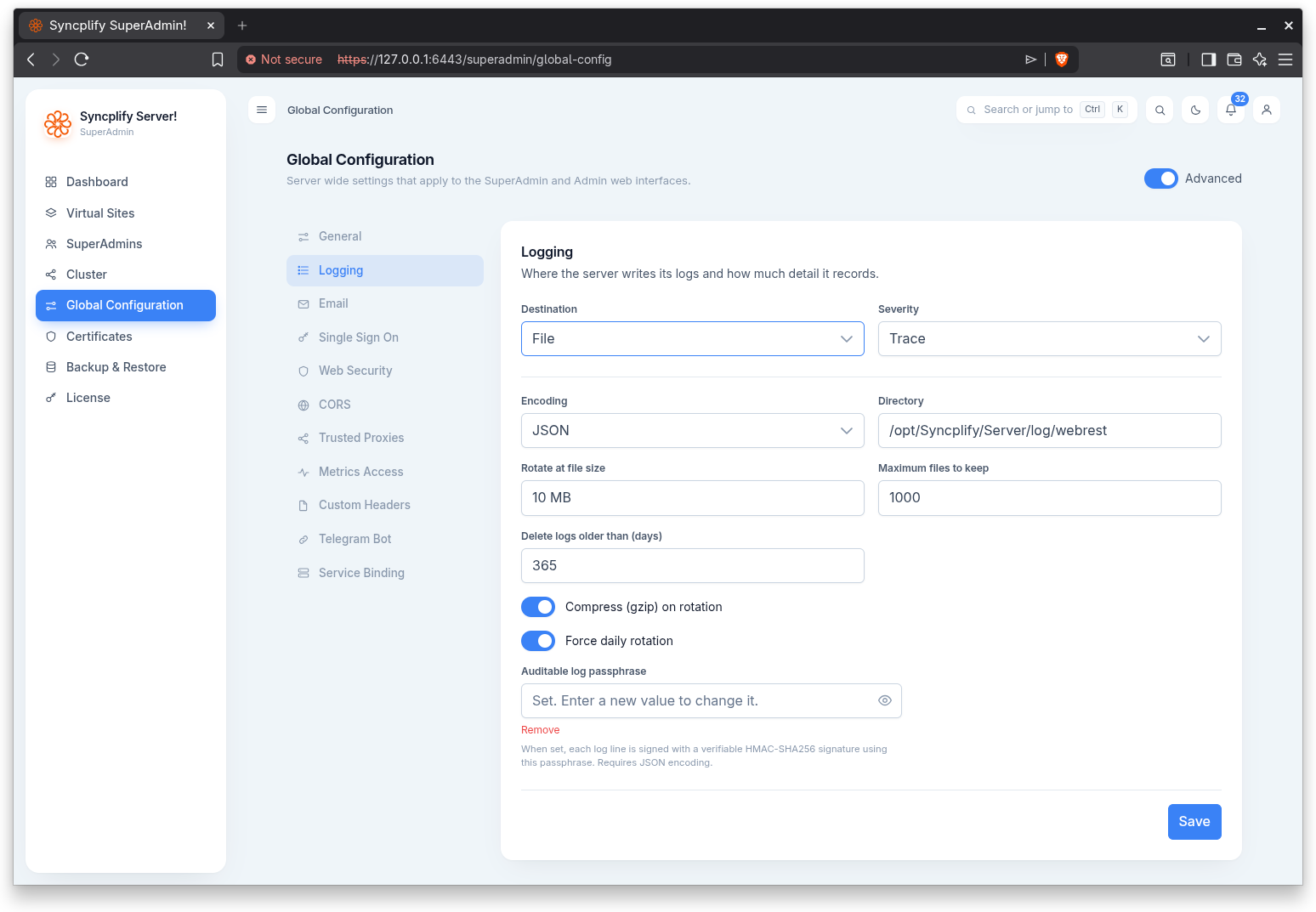
Logging
Where the server writes its logs and how much detail it records.
- Destination: standard output, file, or syslog.
- Severity: Error, Warning, Info, Debug, or Trace.
- Encoding and Colorize output.
- For file logging: directory, rotation at a file size, maximum files to keep, deleting logs older than a number of days, gzip compression on rotation, and forced daily rotation.
- For network (syslog) logging: address, tag, and marker.
- Auditable log passphrase: when set, each log line is signed with a verifiable HMAC-SHA256 signature using this passphrase. Signed audit logs require the JSON encoding.
Email
The mail server used to send notifications and account emails.
- SMTP host and Port.
- TLS mode: none, implicit (SSL/TLS), or explicit (STARTTLS).
- Sender address, Username, and Password.
- Custom HELO/EHLO: sent when connecting to the SMTP server; leave blank to use localhost.
- An option to use custom notification templates, with HTML and text templates.
- A Test action sends a test email to a recipient you specify, using the settings as entered (they are not saved until you save the section).
Single Sign On
The OpenID Connect providers SuperAdmins can use to sign in to this console. The section lists the configured providers with their name, issuer URL, and enabled state, and offers actions to add, test, edit, and delete them. A SuperAdmin account uses these providers when its authentication mode includes single sign on and the account is bound to one of them (see SuperAdmins).
TIP
Everything about OIDC single sign on, including how the flow works, what every provider setting means, and step by step configuration for Google and Microsoft Entra ID, is covered in the dedicated Single Sign On (OIDC) guide.
NOTE
Single sign on relies on OpenID Connect and may require a higher license edition.
Shield
The console's own protection against brute force and scanning of the SuperAdmin and Admin sign in pages. The section holds the rules form, with a simple set always visible and the advanced rules behind a button, and the safe list of addresses and networks the console's Shield never bans. Cluster peers are always exempt and need not be listed. The Review current bans link opens the Shield page. The rules are explained on the Shield, safe list, allow list page.
Update policy
The update policy (notify only or apply automatically when idle, the daily time window, the Apply now grace period, and the release channel URL) is a global setting too, saved with the Global Configuration and replicated to every node of a cluster. It is edited on the Updates page, where its effects are seen, and is documented there.
Advanced settings
The following sections appear when the Advanced toggle is on.
Web Security
Rate limiting and HTTP security headers for the web interfaces.
- Rate limits: global, per API route, per UI route, and for public routes.
- Security headers: enable security headers, allowed hosts, HSTS max age (with include subdomains and preload), referrer policy, content security policy, feature policy, redirect HTTP to HTTPS (with a temporary redirect option), deny framing, content type no sniff, browser XSS filter, CSRF protection, and an option not to redirect IPv4 host names.
CORS
Cross origin resource sharing for the REST API: enable CORS, allowed origins (use * to allow any origin), allowed methods, request headers, exposed headers, and max age.
Trusted Proxies
The addresses and networks from which the X-Forwarded-For and X-Real-IP headers are trusted.
Metrics Access
The addresses and networks allowed to read the Prometheus metrics endpoint.
NOTE
Metrics may require a higher license edition.
Custom Headers
Custom HTTP response headers added to every response. Add a header by name and value; changes take effect immediately.
Telegram Bot
Send notifications and accept commands through a Telegram bot: enable the bot, set the bot token, and choose the allowed commands. Assumes you're familiar with Telegram bot creation and management (if not, please, refer to Telegram's documentation to set up your bot).
Service Binding
The network binding used exclusively by the SuperAdmin and Admin web interfaces.
WARNING
Do not change these settings unless you have a compelling reason and know exactly what you are doing. A mistake here can lock you out of the web interface.
- IP address (or all interfaces) and Port.
- Primary host name and Additional host names.
- Minimum and Maximum TLS version, and the Allowed cipher suites (leave empty for the secure defaults).
- An option for when the interface sits behind a HAProxy using the PROXY protocol.
- Inter process communication: the IPC server always listens on 127.0.0.1; only its port can be configured. Leave 0 to use the default port (7442).