
SMTP (e-mail)
Overview
The SMTP Settings page in the SuperAdmin UI allows you to configure the email server your system will use to send notifications to SuperAdmins and Admins when significant events occur. Proper configuration ensures timely communication of important system events.
Configuration Options
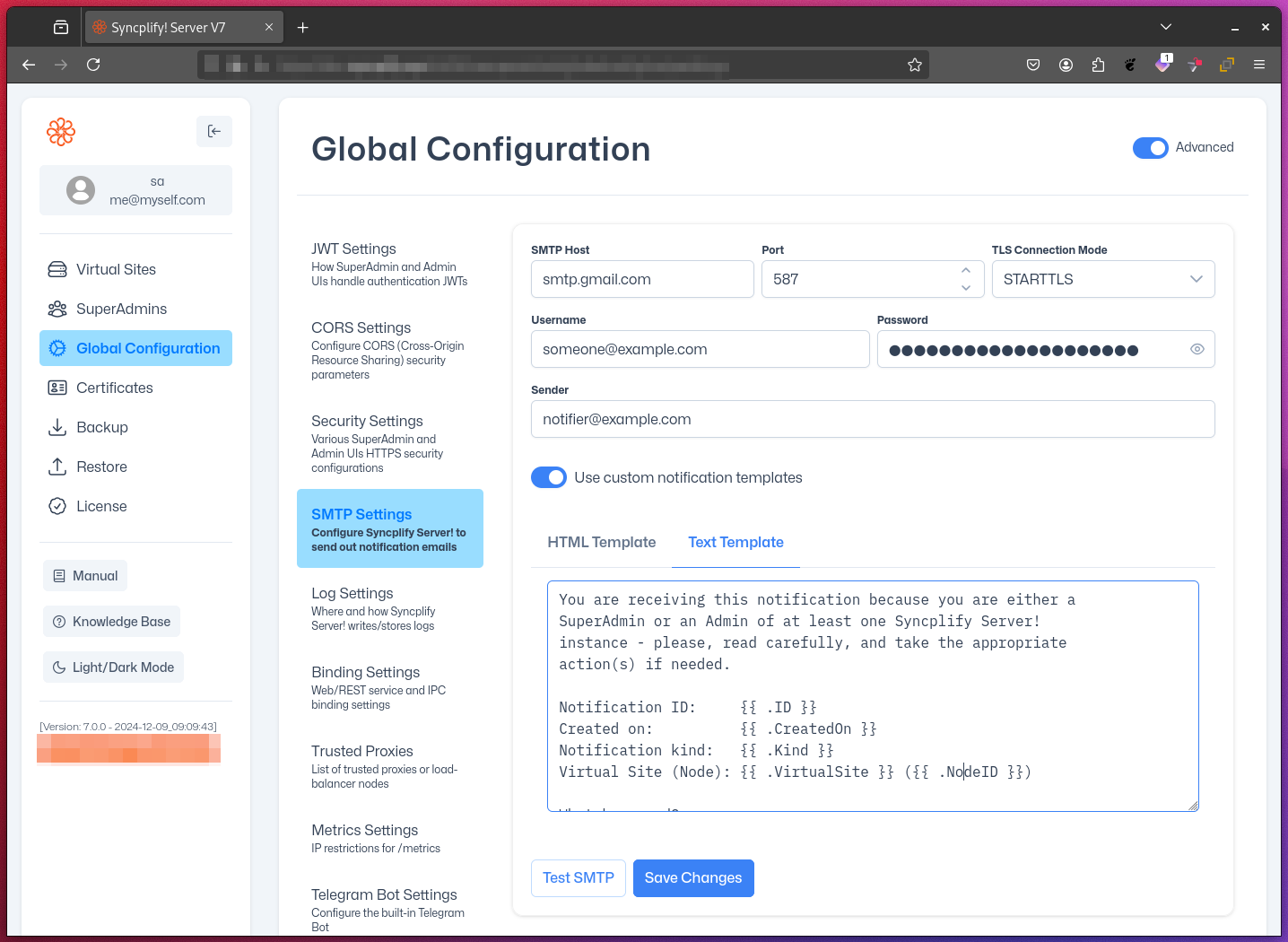
- Host: The IP address or hostname of your SMTP server
- Port: The port number your SMTP server listens on (commonly 25, 465, or 587).
- TLS Mode: Choose from:
- None: No encryption
- Explicit: STARTTLS (recommended)
- Implicit: SSL/TLS from connection start
- Username: Your SMTP account username
- Password: Your SMTP account password
- Sender Email: The email address that will appear in the "From" field
Optional Advanced Settings
By default, Syncplify Server! uses its own built-in email templates for all notifications, but you can fully customize these emails by supplying your own HTML and plain-text templates.
These templates dynamically substitute certain variables with the content of the actual notification being sent. These are the variables you can reference in your templates (both HTML and plain-text):
| Variable | Explanation |
|---|---|
{{.ID}} | the unique ID of the notification being sent |
{{.CreatedOn}} | date and time the notification was created |
{{.Kind}} | The kind or type of notification: information, warning or error |
{{.VirtualSite}} | the ID of the virtual site from which the notification originates (if any, might be empty) |
{{.NodeID}} | the ID of the node (useful in HA deployments) from which the notification originates |
{{.Body}} | arguably the most important variable, this is the actual notification text |
Test Email Functionality
Before applying your SMTP configuration, you can verify that it works:
- Fill in all required SMTP settings
- Click the
Test SMTPbutton - Enter a recipient email address in the pop-up dialog
- The system will attempt to send a test email using the provided configuration
- A success or failure message will be displayed, along with any error details if applicable.
Best Practices
- Use TLS encryption whenever possible for enhanced security
- Regularly update the SMTP password to maintain account security
- Consider using application-specific passwords if supported by your email provider
- Test the SMTP configuration after any changes to ensure continued functionality.
Troubleshooting
If you encounter issues sending test emails, try the following:
- Double-check all entered information for accuracy
- Ensure your SMTP server is reachable from the Syncplify Server! host
- Verify that your SMTP account has the necessary permissions to send emails
- Check your email provider's documentation for any specific configuration requirements