
Additional Web Security Settings
IMPORTANT
Exercise caution when modifying these security settings. Incorrect configuration may impact the accessibility and functionality of your server's SuperAdmin and Admin UIs. Adjust these settings only if you fully understand their implications. If unsure, consult the documentation or a security professional.
The Security Settings section in the Global Configuration page provides advanced options to enhance the security of your web interfaces. These settings help protect against various web-based attacks, such as cross-site scripting (XSS), clickjacking, and protocol downgrade attacks, and improve your server’s overall security posture.
WARNING
Misconfiguring these settings can lock out legitimate users or break integrations with third-party services. Always test changes in a safe environment before applying them to production.
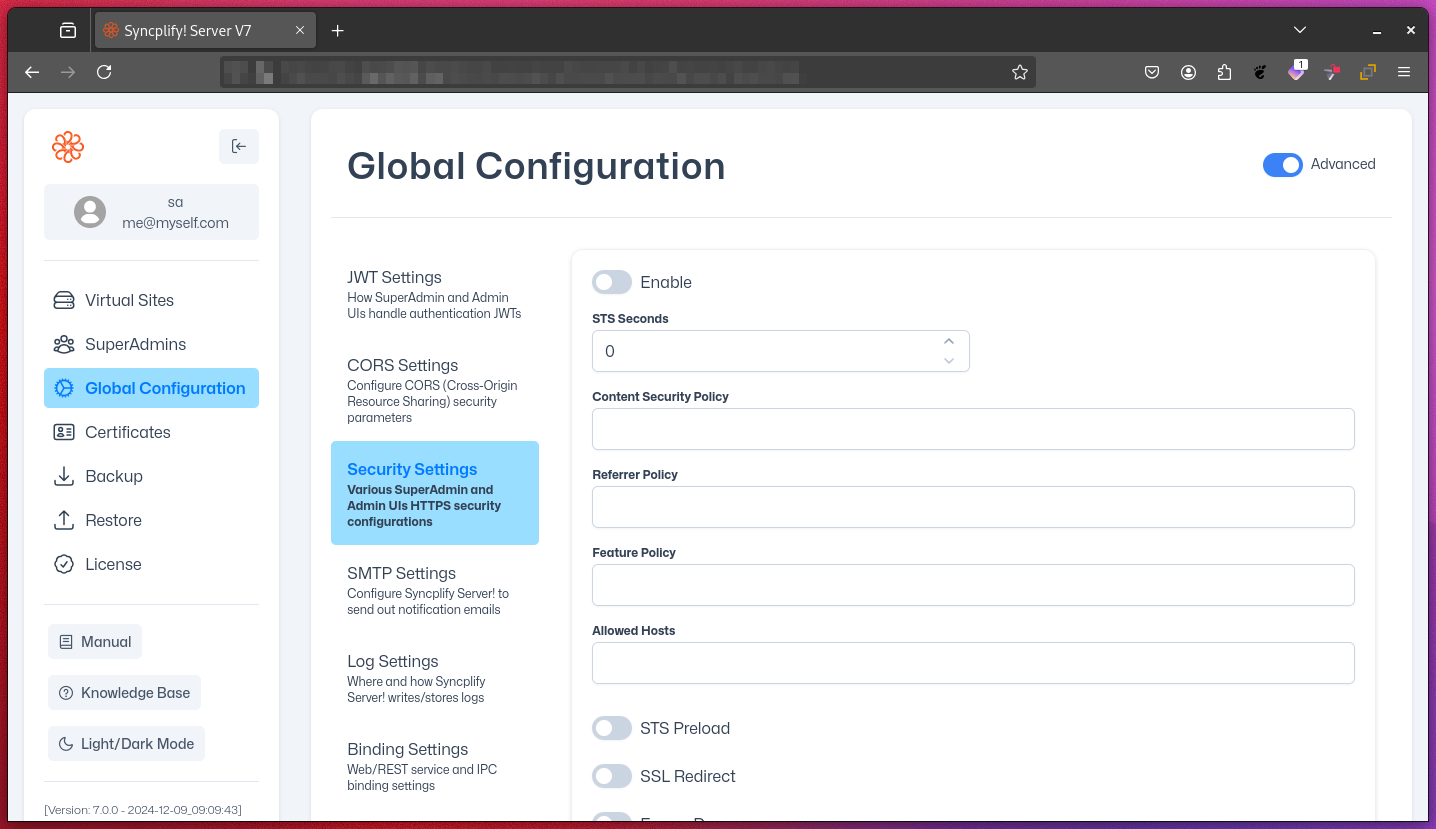
Key Security Settings
STS Seconds (HSTS max-age):
Sets the duration (in seconds) for which browsers should only connect via HTTPS. Helps prevent protocol downgrade attacks.STS Preload:
Enables inclusion in browser preload lists for always-on HTTPS. Only enable if your site is always available via HTTPS.Content Security Policy (CSP):
Restricts which sources can load scripts, images, and other resources. Strongly recommended to prevent XSS attacks.Referrer Policy:
Controls how much referrer information is sent with requests. Helps protect user privacy.Feature Policy (Permissions Policy):
Controls which browser features (like camera, microphone, geolocation) are available to your site and its iframes.Allowed Hosts:
Specifies which hostnames are allowed to serve the site. Prevents HTTP Host header attacks. Especially important for public-facing deployments.SSL Redirect:
Forces HTTP requests to redirect to HTTPS. You can specify the redirect host and whether the redirect is temporary (307) or permanent (301).Frame Deny:
Enables the X-Frame-Options: DENY header, preventing your site from being embedded in iframes (protects against clickjacking).Custom Frame Options:
Allows fine-grained control over iframe embedding (e.g., allow only from trusted domains).Content-Type No Sniff:
Enables the X-Content-Type-Options: nosniff header, preventing browsers from MIME-sniffing responses.Browser XSS Filter:
Enables the X-XSS-Protection header. Note: This is deprecated in most modern browsers but may help with legacy clients.Don't Redirect IPv4 Host Names:
Controls whether IPv4 addresses are redirected to HTTPS. Useful for internal or testing environments.
NOTE
Some settings may affect compatibility with certain clients or third-party integrations. Review each option carefully.
Directives
Below are brief explanations and examples for some of the directives:
Content Security Policy:
Example:default-src 'self'; script-src 'self' https://trusted-cdn.com; img-src 'self' https://img.example.comThis policy allows scripts from your own site and a trusted CDN, and images from your site and a trusted image host.
Referrer Policy:
Example:strict-origin-when-cross-originSends the full URL for same-origin requests, only the origin for cross-origin requests, and no referrer when downgrading from HTTPS to HTTP.
Feature Policy:
Example:camera 'none'; microphone 'self'; geolocation https://maps.example.comDisables camera access, allows microphone access only for your site, and permits geolocation for your site and a trusted map provider.
Custom Frame Options:
Example:ALLOW-FROM https://trusted-site.comAllows your site to be embedded in an iframe only on the specified trusted site.
Further Reading
For more in-depth information, refer to these official specifications and resources: