
LDAP (and Active Directory)
Depending on the edition (license) of Syncplify Server! you own, you may see a section in your Admin UI named LDAP. This section allows you to configure your Syncplify Server!'s connection to one or more LDAP servers, including Active Directory. These connection profiles are used to authenticate certain Syncplify Server! users or groups, depending on their individual configuration.
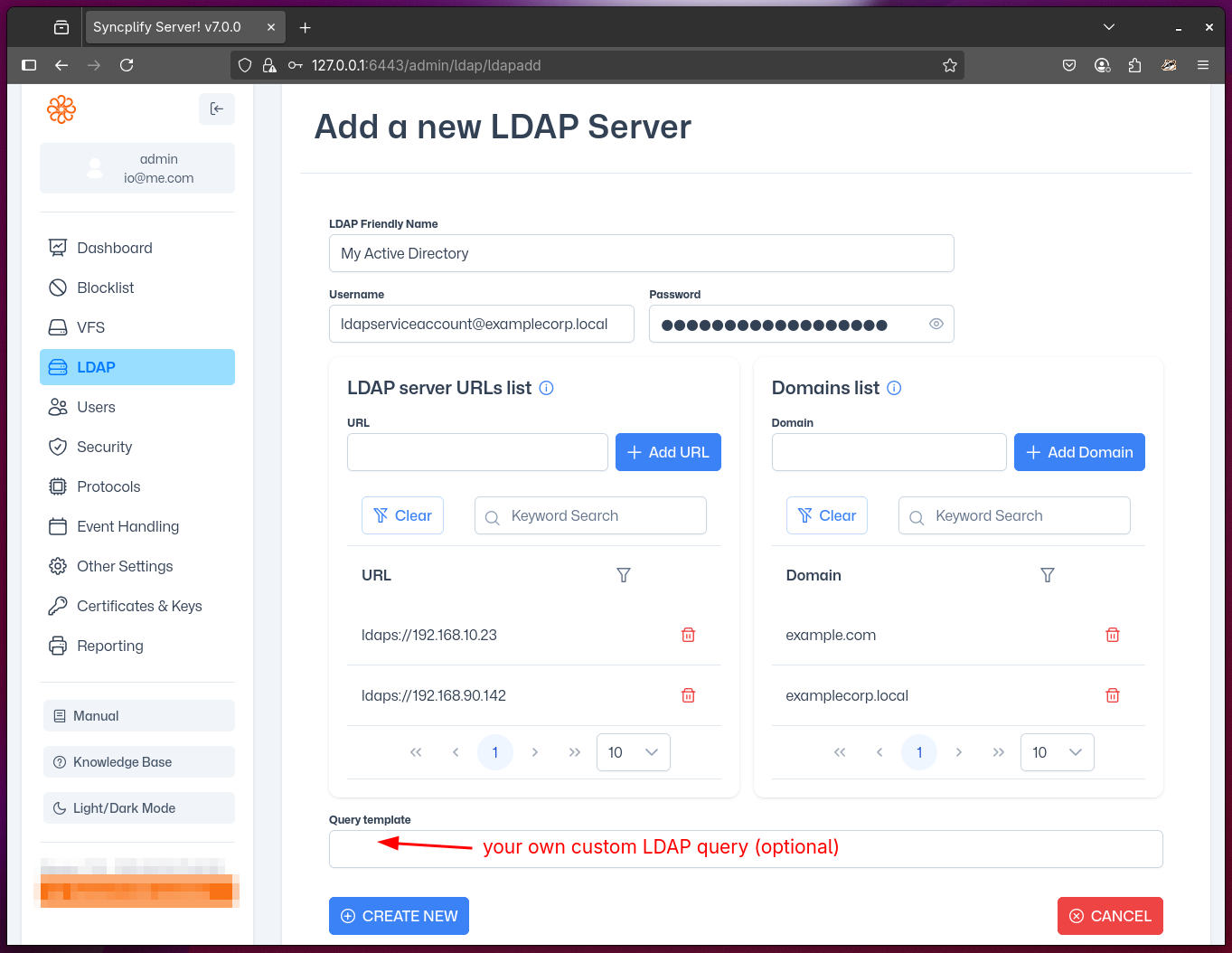
LDAP (Lightweight Directory Access Protocol) is a standard protocol for accessing and managing directory information. Microsoft Active Directory is a widely used LDAP-compatible directory service. Integrating Syncplify Server! with LDAP/AD allows you to centralize user authentication and management, improving security and simplifying administration.
A few important details to bear in mind when configuring an LDAP profile:
- You must specify an account that has sufficient permissions to query your LDAP (or Active Directory) directory.
- The account used to query your LDAP/AD must always be specified in its full UPN (User Principal Name) form and always use your primary domain (e.g., ldapquery@syncplify.local).
- You can specify more than one LDAP server per configuration. Syncplify Server! will query all specified servers for high-availability authentication.
- You can specify multiple domains; they will be queried in the order you insert them.
- The machine (or VM) running Syncplify Server! must be allowed to connect through your firewalls to your LDAP/AD service on the appropriate port(s), based on the LDAP protocol variant (scheme) in your LDAP servers' URLs (e.g., 389 for LDAP, 636 for LDAPS).
- The address of your LDAP/AD service should always be written as a fully-qualified host name or as an IP address or, when you manage your own DNS, as a host name. Never, for any reason, use a NetBEUI name here.
IMPORTANT
Syncplify Server! supports both standard LDAP and secure LDAPS connections. For secure connections, ensure your LDAP/AD server is configured with a valid SSL/TLS certificate, and that the Syncplify Server! host trusts the certificate authority (CA) that issued it. Alternatively, you may add the insecure=true query parameter to the LDAP URL (ex: ldaps://ldap.example.com:636?insecure=true) to bypass certificate validation, but this is not recommended for production environments.
WARNING
Misconfiguring LDAP profiles is a common source of authentication issues. Double-check all server addresses, ports, credentials, and permissions. If authentication fails, consult your LDAP/AD logs and verify network connectivity from the Syncplify Server! host to your directory servers.
For advanced configuration examples and troubleshooting tips, please refer to the knowledge base.