
Advanced SSH/SFTP Settings
This section is intended for experts only, as it allows you to configure advanced aspects of your Syncplify Server!'s SSH2 (SFTP/SCP) protocol handler. These settings require a thorough understanding of the SSH2 protocol standard as defined in its various RFCs. Do not modify these settings unless you are intimately familiar with the relevant RFCs and the security implications of your changes.
IMPORTANT
Changes to any of the settings in this page will only take effect after restarting your virtual site.
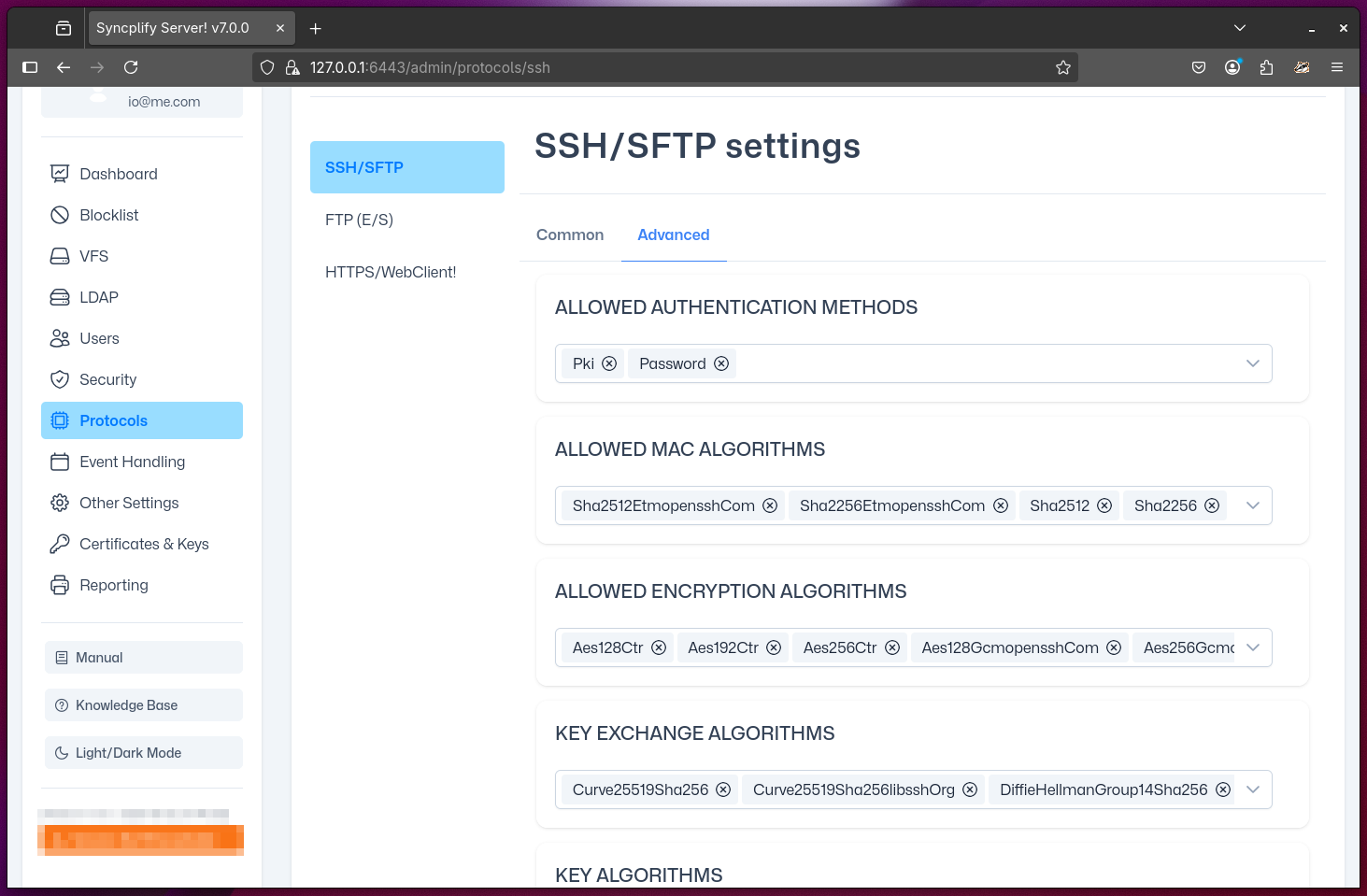
Configurable Details
Allowed Auth Methods
Specify which authentication methods are permitted for SSH2 connections. The possible options are:
- PKI: Public Key Infrastructure (certificate/key-based authentication)
- Password: Traditional password-based authentication
- Keyboard-Interactive: A flexible method that can be used for multi-factor authentication or custom workflows (requires scripting and event-handling to function properly)
NOTE
Enabling or disabling certain authentication methods can significantly impact both security and compatibility with client software.
Allowed MAC Algorithms
Select which Message Authentication Code (MAC) algorithms are allowed for SSH2 connections. MAC algorithms ensure the integrity and authenticity of data exchanged between client and server. Choosing strong, modern MAC algorithms is important for preventing tampering and replay attacks.
Allowed Encryption Algorithms
Choose which encryption (cipher) algorithms are permitted for securing SSH2 sessions. These algorithms protect the confidentiality of data in transit. Disabling weak or outdated ciphers is recommended to maintain a strong security posture.
Key-Exchange Algorithms
Configure which key-exchange algorithms are allowed during the SSH2 handshake. These algorithms are responsible for securely negotiating session keys between client and server. Selecting secure, up-to-date key-exchange methods helps prevent man-in-the-middle and downgrade attacks.
Key Algorithms
Specify which public key algorithms are accepted for authenticating clients and servers. This setting determines which types of cryptographic keys can be used for authentication. Limiting accepted key types to modern, secure algorithms is best practice.
PKI Key Authorization Algorithms
Define which algorithms are accepted for authorizing public keys in PKI-based authentication. This setting controls how the server validates client certificates or public keys. Using secure, standards-compliant algorithms is essential for robust authentication.
Diffie-Hellman Group Exchange Bitness
Set the minimum and maximum bit length for Diffie-Hellman group exchange during key negotiation. Larger bit lengths provide stronger security but may impact performance. Adjust these values according to your organization's security requirements and compatibility needs.