
The Blocklist
The blocklist (formerly known as blacklist) is a list of IP addresses and networks (in CIDR notation) that are blocked by Syncplify Server! and cannot connect to any protocol handler (SSH, SFTP, SCP, FTP, FTPS, WebClient!, etc.).
How Items Are Added to the Blocklist
Items can be added to this list in two ways:
Manually by an administrator – Administrators can manually add IP addresses or network ranges to permanently block specific sources.
Automatically by Syncplify's Protector™ subsystem – This intelligent attack detection system identifies potentially dangerous situations and automatically blocks the perpetrator's IP address for a configurable amount of time.
Automatic Blocking Behavior
NOTE
IP addresses that are automatically added by Protector™ are only temporarily blocked. If further attacks are detected while the originating IP address is already blocked, the block-out time is automatically increased by a configurable percentage. This means that repeat offenders face progressively longer blocking periods, providing adaptive protection against persistent threats.
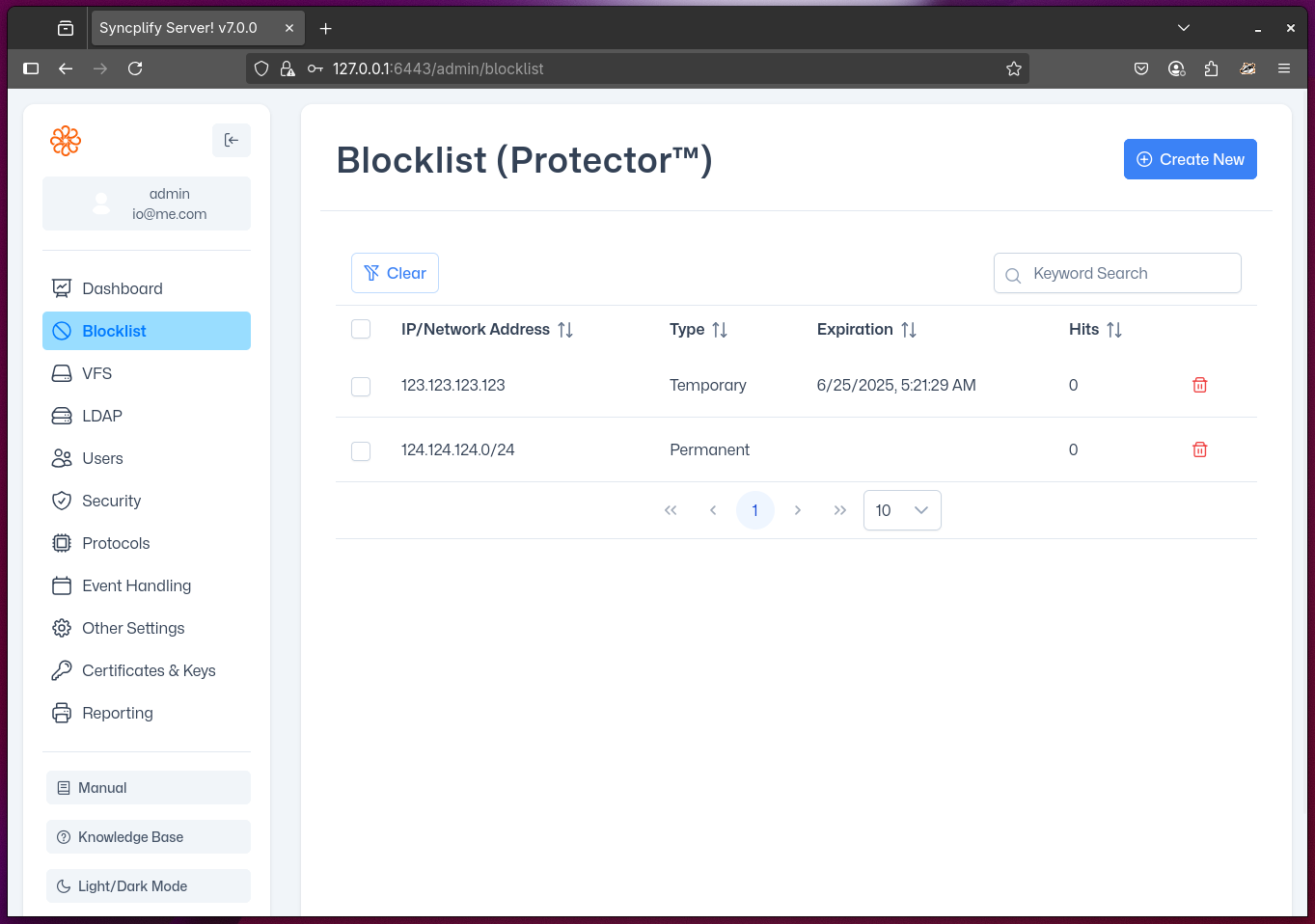
The image above shows a Class C network manually and permanently added to the blocklist by an administrator, as well as an individual IP address temporarily added by Protector™.