
One-click Security Configuration
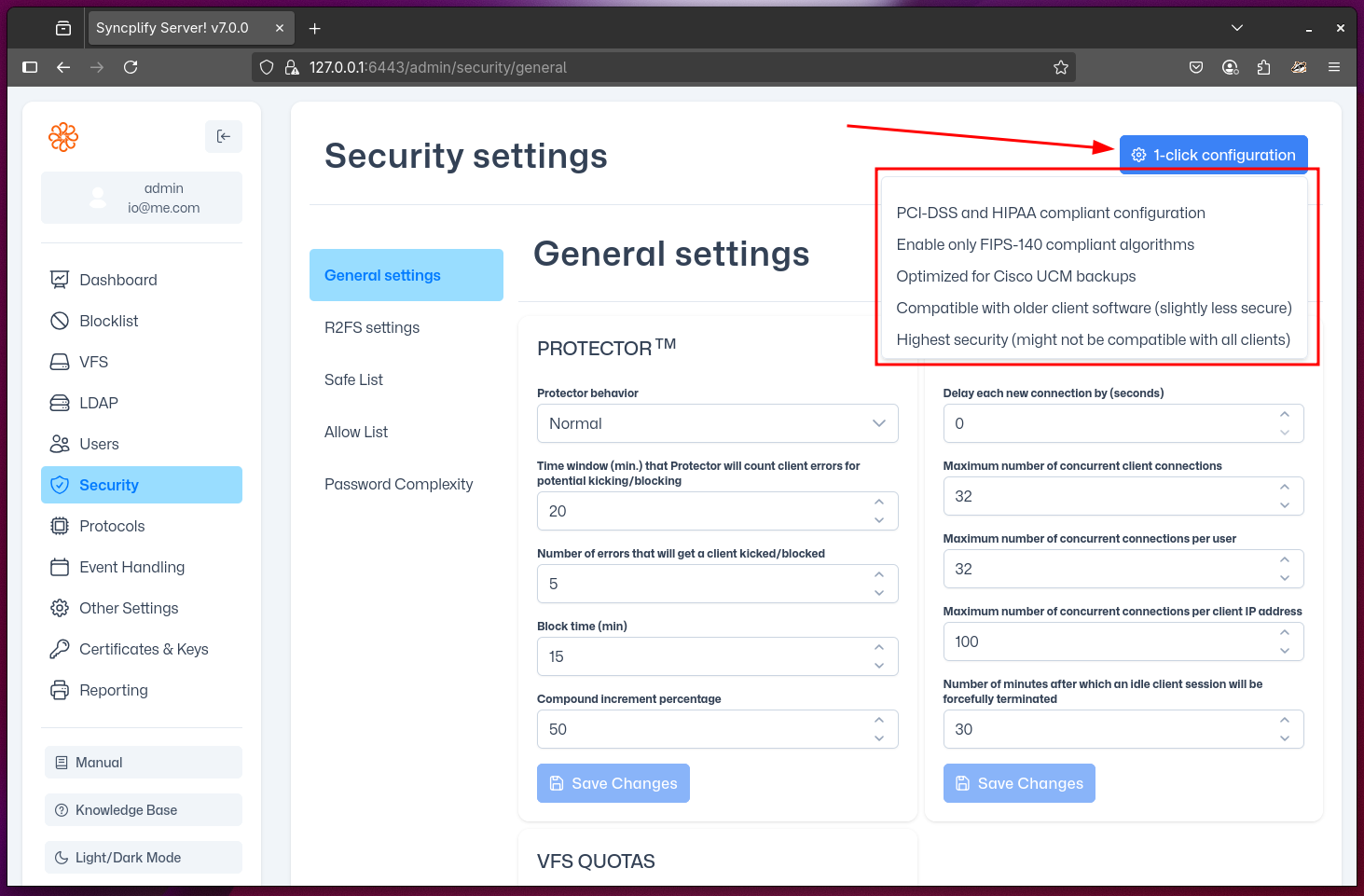
In the top right corner of the Security section (regardless of which sub-page you are on), you will find the 1-click configuration button. This feature allows you to configure your entire Syncplify Server!'s security posture in just one click.
NOTE
The 1-click configuration does not only affect the settings in the "Security" section. It configures hundreds of settings across your server, including protocol-specific security features, certificates and host keys, authentication methods, and subsystems. It is a comprehensive security reconfiguration.
IMPORTANT
After applying a 1-click scenario, a restart is typically required. The new security posture will take effect only after the virtual site is restarted by a SuperAdmin.
The 1-click Scenarios
You can use 1-click configuration to quickly set up your Syncplify Server! for the following common scenarios:
PCI-DSS and/or HIPAA
This scenario configures your server to comply with the security requirements of the Payment Card Industry Data Security Standard (PCI-DSS) and the Health Insurance Portability and Accountability Act (HIPAA). It enforces strong encryption, disables insecure protocols and ciphers, and ensures that only secure authentication methods are allowed. This is suitable for environments handling payment card data or protected health information.
- Only strong ciphers and protocols are enabled (e.g., TLS 1.2+)
- Weak authentication methods (like plain FTP or weak passwords) are disabled
- Logging and auditing are configured to meet compliance requirements
FIPS 140
This scenario configures your server to use only cryptographic modules and algorithms that are FIPS 140-2 validated. This is required for certain U.S. government and regulated environments.
- Only FIPS-approved ciphers and algorithms are enabled
- Non-FIPS cryptographic options are disabled
- All protocol handlers are set to use FIPS-compliant settings
WARNING
Enabling FIPS 140 mode may break compatibility with some older clients that do not support FIPS-approved algorithms.
Cisco UCM Backups
This scenario configures your server for maximum compatibility with Cisco Unified Communications Manager (UCM) backup operations. It enables the specific protocols, ciphers, and authentication methods required by Cisco UCM.
- Protocols and ciphers required by Cisco UCM are enabled
- Other security settings are adjusted for compatibility
- Not recommended for general-purpose use, as it may lower security in favor of compatibility
Broad Compatibility
This scenario configures your server for the widest possible compatibility with a variety of client software, including older clients. It enables a broader set of protocols and ciphers, while still maintaining a reasonable level of security.
- Most common protocols and ciphers are enabled
- Some older, less secure options may be available for legacy clients
- Recommended only if you need to support a wide range of client software
WARNING
This scenario is less secure than the others, but still reasonably safe because of Syncplify Server!'s safety-by-design approach.
Highest Security
This scenario configures your server for the strictest security posture. Only the most secure protocols, ciphers, and authentication methods are enabled. This is suitable for environments where security is the top priority, even if it means breaking compatibility with older or less secure clients.
- Only the latest and most secure protocols and ciphers are enabled (e.g., TLS 1.3 only)
- All legacy and insecure options are disabled
- May require users to update their client software to connect
WARNING
This scenario provides the highest level of security, but may break compatibility with older or non-compliant client software.