
Binding Settings
The Binding sub-section in the Global Configuration page controls how Syncplify Server!'s Web/REST service binds and listens on the host system's network interface(s). These settings are crucial for determining the server's accessibility and security.
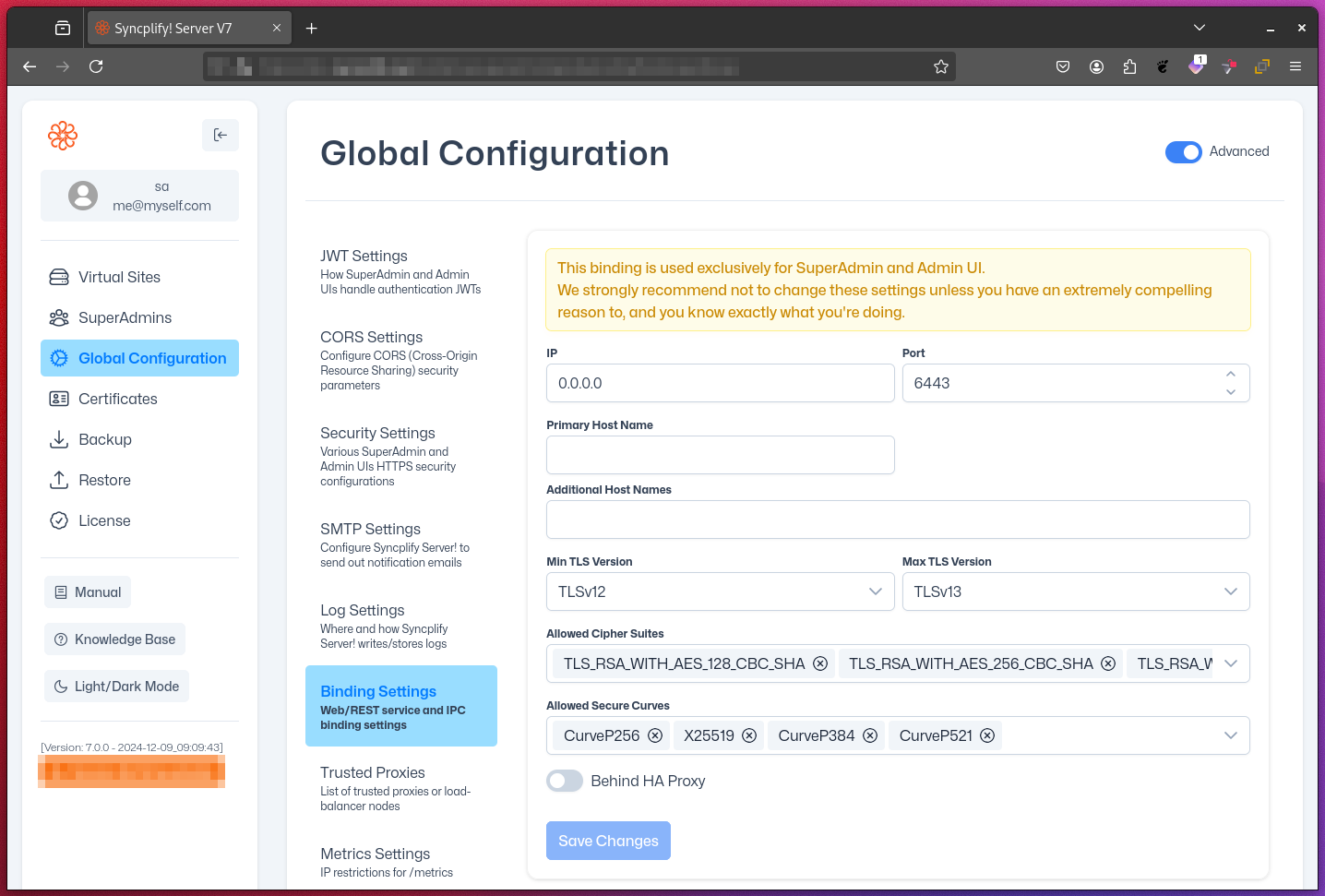
IP Address
- Default: 0.0.0.0 (all available IPs)
- Specifies which IP address(es) the server should bind to
Port
- Default: 6443
- Determines the port on which the Web/REST service listens
WARNING
Changing the port from its default (6443) is an extremely dangerous operation.
Doing so can instantly make your server or node unreachable, break all high-availability (HA) deployments, and disrupt every UI and/or REST API client and integration that relies on the current port.
Do NOT change this port unless you are absolutely certain of the consequences, have coordinated with all stakeholders, and are fully prepared to accept total responsibility for any resulting outages or data loss.
In almost all cases, the default port should not be changed. Use port-forwarding on your router/firewall if you wish to access the SuperAdmin and Admin UI on a different port from ourside your local network.
Primary Host Name
- Strongly recommended to set
- Defines the main host name for the server
Additional Host Names
- Optional
- Allows the server to respond to multiple domain names
TLS Version Control
- Minimum TLS Version: Choose from 1.0, 1.1, 1.2, 1.3
- Maximum TLS Version: Choose from 1.0, 1.1, 1.2, 1.3
- Enables fine-tuning of supported TLS protocols for security
Allowed Cipher Suites
- Specifies which encryption algorithms are permitted
Allowed Secure Curves
- Defines the elliptic curves allowed for TLS connections
Behind HAProxy
- Enables the use of HAProxy protocol
- Useful when the server is behind a load balancer supporting this specific protocol
IPC Server Port
- Default: 7442
- Used for Inter-Process Communication
IMPORTANT
Carefully consider your network architecture and security requirements when configuring these settings. Incorrect configuration may impact the server's accessibility or security. If you're unsure about the optimal settings for your environment, consult with your network administrator or IT security team. In most cases the default settings are already perfect and don't need to be changed.